
What value does AI truly deliver?


What value does AI truly deliver?
I may have spent the last 10 years on the business side of things — after an early career as a technologist building stock exchanges and trading platforms, followed by a move into tech advisory — but those who know me will tell you I'm still very much a geek at heart. It's this dual experience of building technology, and more recently being a customer of technology, that helps Aldemis bridge the gap for our customers… but this isn’t a sales pitch.
As a geek who still loves coding, I've followed the AI coding movement closely. While there have been some impressive advances, for me the proof is in the pudding. Until a real application is built, released, and used, it's hard to draw meaningful conclusions about the actual benefits of using AI. In the vein of one of my favourite sayings: ‘I could get my mom to build you a Windows calculator, it would look like it is working, but it wouldn’t be scalable, secured, or anywhere close to being maintainable!
That's why I decided to take my latest idea and build it entirely with AI. The website below is the result — built using Claude Code (Opus 4.6) on the Max Plan. I've also pasted below every prompt I used along the way.
I did nothing beyond writing the prompts listed below (less than 100 prompts in total). I didn't modify the code by hand. I didn't touch a single thing outside of the Claude window itself *.
The whole thing took me roughly 9 hours from start to finish (though most of that was waiting for Claude to do its thing, so I was getting on with other tasks in the meantime). If I'd done this the traditional way, I estimate it would have taken around 8-10 days.
Here's what I find particularly interesting: if you look through my prompts, fewer than 5% of them are actual technical requirements. Everything else is business requirements.
The website and code are by no means perfect, but the result given the effort involved is genuinely remarkable. Some prompts felt especially easy such as 'deploy to AWS' and... job done! Or 'containerise everything'.
This was a greenfield build, which is always easier for AI to handle. That said, I have used Claude on an existing project too, and I have no reason to think the results would be dramatically different.
I feel like I've only scratched the surface of what's possible. One of my colleagues even took a screenshot of our JIRA board and had Claude implement all the tickets assigned to him…
Website: https://cofound.website
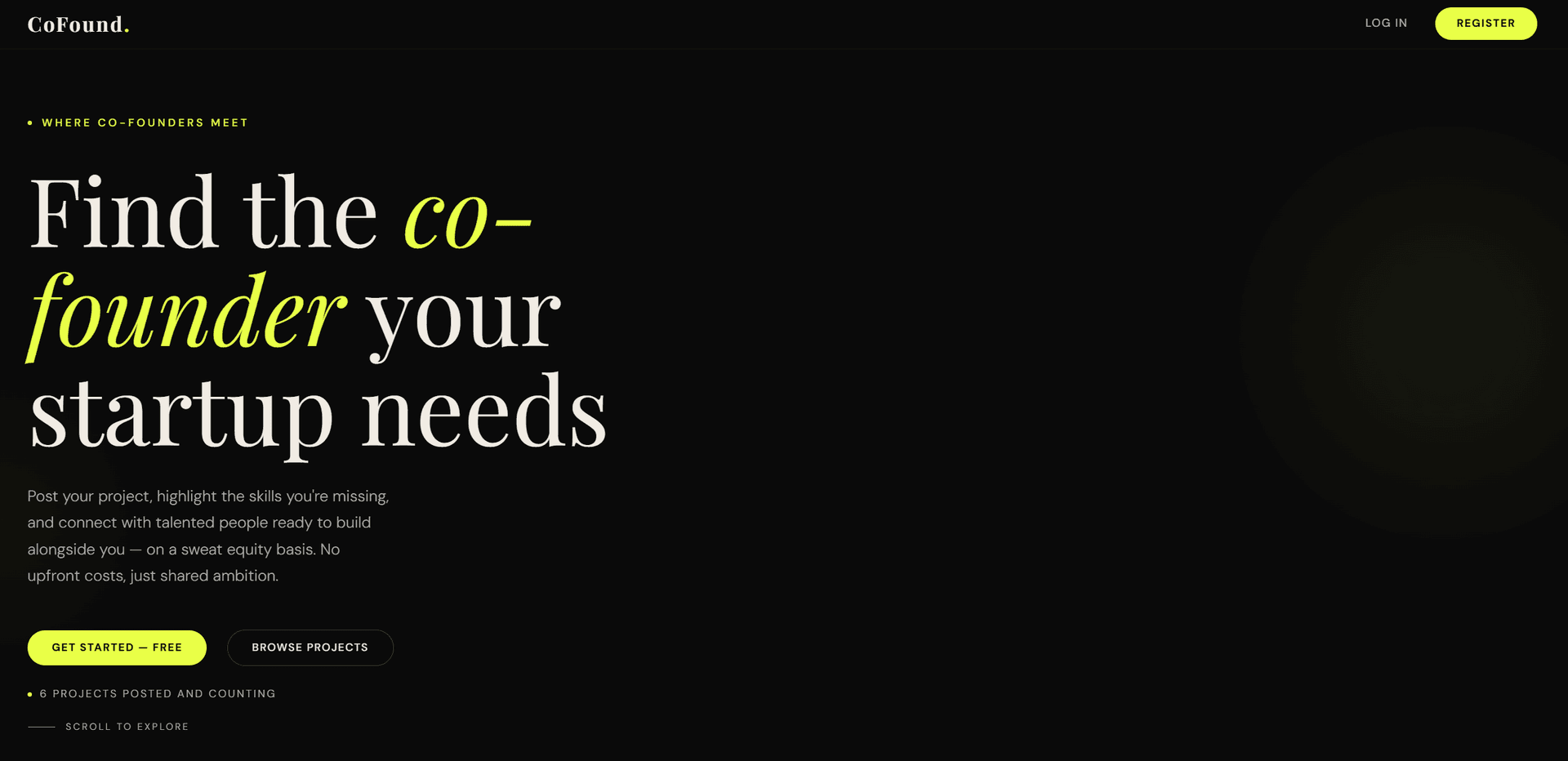
I do have follow-up questions though - for which I would love the view of any AI expert:
- It is clear that AI companies are absorbing some of the cost of running the models, what will happen once AI usage is priced at real cost?
- Given that so few of my prompts are technically driven, are we now in a situation where a non-technical person can start building very complex, production-ready applications?
I'm also happy to share the full source code if you'd like to review its quality— just drop me an email at [email protected]
And, if you like the CoFound idea, feel free to spread the word and add your profile / project to it. It would be nice to turn it into something useful for start-up founders.
* [EDIT] Following a question I received: I did indeed leave Claude to register the domain name and update the DNS settings.
Prompts used
Software architecture & first features
Prompt 1:
I'd like to build an application from scratch. it will be a website allowing users to register and post projects for other to comment on. I'd like the back-end to be node.js with a postgres database. what front-end technology do you recommend?
---
Prompt 2:
ok, let's go with React + Vite. can you start by creating a project structure please, with 2 root directories, 1 for the front-end and 1 for the back-end
---
Prompt 3:
could you please rename the client directory into frontend and the server into backend
---
Prompt 4:
if I give you the connection details for my local postgres instance, can you install the DB and run the project yourself?
---
Prompt 5:
localhost:5432/postgres , username is postgres and password is ****************
---
Prompt 6:
the front-end is empty, i was expecting to land on a login and registration page
---
Prompt 7:
There is no button to create a project, could you add one. I should be able to see the button on the home page but I need to be logged in to be able to create the project
---
Prompt 8:
there shouldn't be a username on the registration, we should use the email for the username. But I'd like to add a firstname and lastname
---
Prompt 9:
there is a UI display issue on the registration page, the lastname text box goes outside of the registration box
---
Prompt 10:
I got a registration failed message when registering
---
Prompt 11:
Can you also make sure the code is well documented and that there is plenty of logs for support and maintenance
---
Prompt 12:
After publishing the project, I get redirected to the project details page, but that page only contains a title and no project information, could you fix it please?
---
Prompt 13:
can we add a settings section where the user can change its password
---
Prompt 14:
I'd like the settings and logout link to be in a dropdown menu which appears when clicking on my name in the top bar
---
Prompt 15:
can we update the model so that the project publisher can add team members that he is looking for to join the project
---
Prompt 16:
Could we add a professional profile section so that a logged in user can fill in his profile, short description of their skills and experience, their linkedin profile URL, their availability (number of hours available per week)
---
Prompt 17:
could you add the ability to upload a picture on the professional profile
---
Prompt 18:
I'd like to split registered users into 3 categories: contributors, project lead, investors. each category should have it's own registration link so 'register as a contributor', 'register as a project lead', etc...
---
Prompt 19:
could we add a messaging area so that 2 logged in users can message each others
---
Prompt 20:
from now on, please stop asking me to confirm code changes and db changes and just proceed
---
Prompt 21:
only project leads should be able to create projects
---
Prompt 22:
i've upagraded my account, the limit should have been increased
---
Prompt 23:
can you add an email verification step please
---
Prompt 24:
here is the username and password, please update the .env file, username: ***@ethereal.email , password: ******************
---
Prompt 25:
the email wasn't received, could you check what went wrong
---
Prompt 26:
I tried again and the email was still not received
---
Prompt 27:
i've updated the env file, can you restart the server please
---
Prompt 28:
i tried the email verification link from that email but got an error message that the verification link had expired
---
Prompt 29:
can you get me the last 20 lines of logs
---
Prompt 30:
where is the log located on the filesystem?
---
Prompt 31:
i just registered with a new user (firstname Karen) but I can't see anything in the logs
---
Prompt 32:
i've tried again (user is Luca Ney) and the call to the backend responded with a 201, but I still can't see that registration in the logs
---
Prompt 33:
you're running the backend for me so I can't check that, can you just give me the log file location and i'll tail it
---
Prompt 34:
can you run the project please
---
Prompt 35:
can you please start a new part of the project, in a root folder called 'admin' to create an admin portal for the application please
---
Prompt 36:
either i forgot my password or the login isn't working
---
Initial design attempt
---
Prompt 37:
th eprimary color is #1a4b40 and secondary color is #ffffff pleas change those accross the whole project
---
Prompt 38:
how can I give you my logo so that you use it
---
Prompt 39:
here it is
---
Prompt 40:
it's here: P:\aldemis\projects\sweat-equity\logo.png
---
Prompt 41:
sorry, can you use this logo instead: P:\aldemis\projects\sweat-equity\logo.svg
---
Prompt 42:
the logo doesn't show, all i can see is a white box where the logo should be
---
Prompt 43:
can you increase the header size by 1.5x and make it white please, increase the logo size by the same ratio
---
Prompt 44:
increase by 1.5x again please
---
Prompt 45:
on the admin portal only, could you replace the logo with this one: P:\aldemis\projects\sweat-equity\logo_white.png
---
Full Design Creation with Claude
Got design built using Claude web standard version:
Can you create a landing page design which should be fashionable but professional, the website is about helping start-up founders find co-founders on a sweat equity basis. The website allows founders to post their project and highlight which skill(s) they're missing and trying to get help for. Could you redesign the page with this in mind and also highlight a few of the benefits
---
Prompt 46:
here is a landing page design: P:\aldemis\projects\sweat-equity\landing-page.html , can you update the website design to match it, please match all logo and colors
---
Prompt 47:
color changes are good, but I'd also like the landing page to match the html template i provided
---
Prompt 48:
thanks, the grey text (#6b6b6b) is a little too dark and difficult to read, can you change it to #ababab
---
Prompt 49:
can you rename contributor to co-founder
---
Prompt 50:
and project lead as Lead Founder
---
Prompt 51:
please generate a relevant privacy policy and terms of use, given what the website does.
---
Prompt 52:
please generate 10 test users for each category of registration, as well as 5 test projects, make sure projects are posted by different test users
---
Prompt 53:
can you increase all fonts by 20%
---
Prompt 54:
can you replace the login link under the main banner by 'browse projects'
---
Prompt 55:
and can you add the number of projects already posted underneath it, just like the original design I provided
---
Prompt 56:
can you increase the fonts on the login and register page too, like you did for the home page. also increase fonts on the admin portal section
---
Prompt 57:
increase fonts in the admin portal by another 20%
---
Prompt 58:
once logged in, the browse projects link on the home page don't work
---
Prompt 59:
browse projects links on the home page should link to another page where all projects are displayed, they should not link to a home page section
---
Prompt 60:
on the project details page, please add a link to go back to the project list page
---
Prompt 61:
once logged in the post your project link should not appear for investor and co-founders
---
Prompt 62:
good work, please commit all that into a new branch called Feature/initial_build
---
Prompt 63:
can you push the branch to the repo please
---
Prompt 64:
thanks, move back to the main branch (that initial_build branch has now been merged with the main branch)
---
Prompt 65:
can you please extract every single prompt i've made during this project into a text file
---
Prompt 66:
please add a forgotton password link on the login page for both the main portal and the admin portal
---
Prompt 67:
the legal entity behind the website is Aldemis Ltd, 86-90 Paul Street, London, EC2A 4NE, United Kingdom, registration number 07331439 . the contact email should be [email protected] . could you update the privacy policy and T&C with that info please
---
Prompt 68:
can you make sure all requests and responses sent to the back-end (both portal and admin) are logged please. please make sure any password is ****************
---
Prompt 69:
can you make sure there is proper exception handling, and related logging, throughout the whole project please
---
Prompt 70:
the admin portal isn't responding anymore, could you have a look
---
Prompt 71:
can you configure the project to use gmail as the SMTP server, my username is [email protected] and the password is ****************
---
Prompt 72:
i don't seem to have received the email, can you check if something went wrong
---
Prompt 73:
the actual password has been updated to **************** , here is the app password: **** **** **** ****
---
Prompt 74:
it's still not working
---
Prompt 75:
can you run the project please
---
Prompt 76:
email is working, but the link in it isn't. when clicking on it, it says verification failed, invalid or expired link
---
Prompt 77:
it's working well. could you commit to a new branch called Feature/first_release and push it to the repo please
---
App Signal & Containerization
Prompt 78:
can you now configure the project for appsignal
---
Prompt 79:
********-****-****-****-************
---
Prompt 80:
appsignal doesn't seem to be receiving any data, could you check what's wrong?
---
Prompt 81:
still not working, here is what appsignal suggests: Check your log file and the docs
See if appsignal.log is reporting errors.
The debugging docs page contains further debugging instructions.
Run our diagnostics tool
Run npx @appsignal/cli diagnose to generate a diagnostics report.
Email it to us for help!
---
Prompt 82:
can you containerise the project and push to docker. docker is already installed locally
---
Prompt 83:
here is the error i'm getting: unable to get image 'sweatequity-admin': error during connect: Get "http://%2F%2F.%2Fpipe%2FdockerDesktopLinuxEngine/v1.49/images/sweatequity-admin/json": open //./pipe/dockerDesktopLinuxEngine: The system cannot find the file specified.
---
Prompt 84:
There isn't any data anymore, is this a DB connection issue?
---
AWS deployment
Prompt 85:
Here is my Aws access key: AKIA**************** and secret: ************************************. Please install the full project on AWS. Use the existing vpc and subnet. It's for demo only so go for a cheap setup. Main website should respond to HTTPS://www.cofound.website, please setup SSL certificates. Admin portal should respond to HTTPS://admin.cofound.website
---
Prompt 86:
can you commit everything into a new branch called Feature/container-and-deployment and push to the repo
---
Prompt 87:
can you summarise to me what you did to deploy it to AWS please
---
Prompt 88:
sorry, I should have said, could you move everything to eu-west-2
---
Prompt 89:
have you made any code changes that need to be committed?
---
Prompt 90:
please commit and push
---
Prompt 91:
can you please extract all prompts I've made in this project into a text file
---
Prompt 92:
please update the file to only include the prompt, none of the analysis or context you provided. could you also obfuscate any password or keys